fixed : how many 4K screens can my M1/M2/M3/M4 Mac handle simultaneously ?

Question :
I have an M3 MacBook that I would like to use with 2 external 4K monitors for my work setup, so I bought an extra 4K monitor, but when I tried to connect it to my MacBook, it didn’t work… What is wrong ?

How many displays can I connect to my M3 MacBook simultaneously ?


Answer :
There are hardware limitations to how many additional screens you can connect to a Silicon (M1/M2/M3/M4) Mac, and they are not the same for the basic M-version, the Pro-version and the Max-version. Actually, it’s quite confusing, because there’s also variation in what you can connect using either Thunderbolt or HDMI. Please find the number of external screens you can connect in the tables below [ warning ! the below may contain typos, do doublecheck on the official Apple website ] :

4K-resolutionover Thunderbolt onlyover Thunderbolt + HDMI
M1+1+1
M1 Pro+3+3
M1 Max+3+4
M2+1+1
M2 Pro+2+2
M2 Max+3+4
M3+2 (but only with lid closed)+2 (but only with lid closed)
M3 Pro+2+2
M3 Max+3+4
M4+2+2
M4 Pro+2+2
M4 Max+4+4
6K-resolutionover Thunderbolt onlyover Thunderbolt + HDMI
M1+1+1
M1 Pro+2+2
M1 Max+3+3
M2+1+1
M2 Pro+2+2 (but HDMI max. 4K)
M2 Max+3+4 (but HDMI max. 4K)
M3+2 (but 2nd max. 5K)+2 (but HDMI max. 4K)
M3 Pro+2+2 (but HDMI max. 4K)
M3 Max+3+4 (but HDMI max. 4K)
M4+2+2 (but HDMI max. 4K)
M4 Pro+2+2 (but HDMI max. 4K)
M4 Max+4 (daisy chaining needed)+4 (but HDMI max. 4K)
8K-resolutionover Thunderboltover Thunderbolt + HDMI
M1not possiblenot possible
M1 Pronot possiblenot possible
M1 Maxnot possiblenot possible
M2not possiblenot possible
M2 Pronot possible+1 (over HDMI only)
M2 Maxnot possible+1 (over HDMI only)
M3not possiblenot possible
M3 Pronot possible+1 (over HDMI only)
M3 Maxnot possible+1 (over HDMI only)
M4+1+1
M4 Pro+1+1
M4 Max+2+2

so… generally, all M1/M2/M3/M4 Macs can support at least one external 4K (or even 6K) screen, but if you want connect multiple external screens to your MacBook, you are probably goning to need a multi-monitor-hub, like the BenQ beCreatus DP1310 docking station.

The BenQ beCreatus DP1310 docking station will enable every silicon (M1/M2/M3/M4) MacBook to connect over USB-C to up to 3 external 4K screens (2 over HDMI and the 3rd over DP/DisplayPort).

The regular price of the DP1310 Dock is ca. €300, so check out below if you can get a better price on Amazon [we get a tiny fee if you buy anything using these links, but you will not be paying anything extra] :

BenQ beCreatus DP1310 dock on Amazon US
BenQ beCreatus DP1310 dock on Amazon UK
BenQ beCreatus DP1310 dock on Amazon DE

enjoy 😉

test : iPhone 5 covers compared

Searching for a good cover for a brand new iPhone 5, I had to do a lot of searching, since most iPhone 5 covers do not meet these three minimum requirements :

1- anonymity : it should not be too easy for others to see that I am holding an iPhone, so the Apple logo must be covered (the cover should preferably be plain black, distinguished in design and not too bulky)

2- small cut-out for the rear-camera : different from iPhone 3G(S) and iPhone 4(S) covers, most iPhone 5 covers have an extremely large cut-out for the rear-camera – this should be considered a design failure, since there is no technical need for this and it means that there will be two differently colored materials from the back of the iPhone visible in the cut-out… which looks extremely un-stylish…

3- ports & screen protection : the ports (audio headphone jack and lightning cable port) should be covered to not gather dust or sand, and the screen should be protected from accidental scratching (without having to turn to a flip-case design)

Luckily, during my elaborate search I found the solution(s) for the third requirement :

– the best ‘dust stopper’ is by far the “(unbranded) iPhone 5 Combined Headset and Lightning Dust Stopper“, because it’s flexible/elastic and you will not easily loose it since it stays fixed to the iPhone (thought the headphone jack) when you have to unplug it for charging

– probably the best ‘screen protector’ I’ve come across is the “Colorfone Screen Guard (Clear) for iPhone 5“, because it leaves the screen colors and sharpness intact, it has  extremely minimal cut-outs (for the menu-button, the front-speaker and the front-camera) and it took little effort to place without bubbles or dust-particles

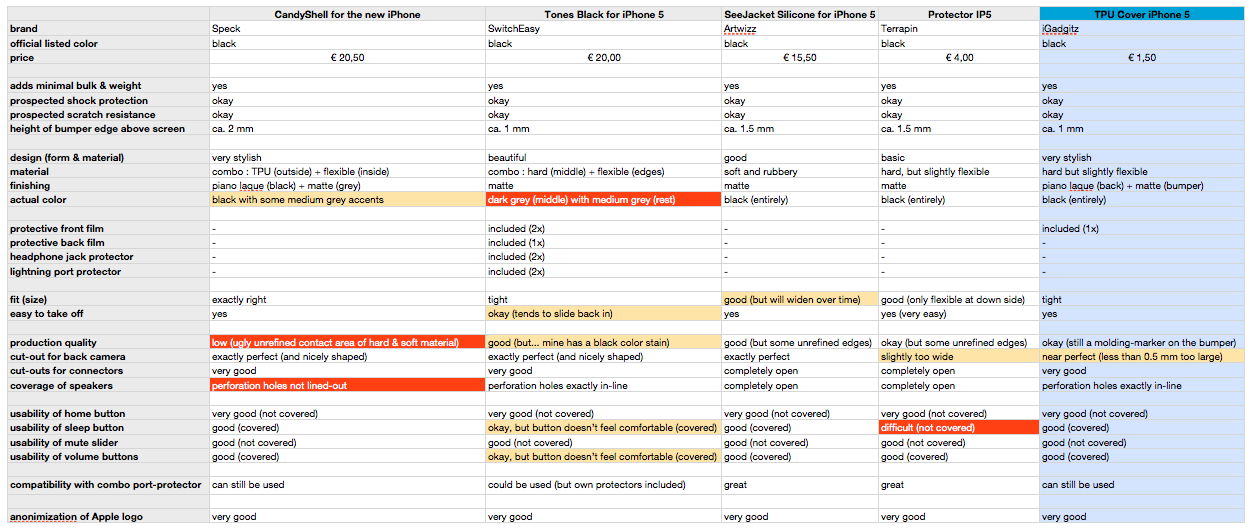
The first two requirements however where too much for most cases, including my initially preferred brands like Belkin, Marware, STM and Griffin (and other ones like Kensington, Macally, Incase, Incipio, Gear4, Muvit, Rocketfish, Ozaki and Xqisit). So I ended up comparing these five iPhone 5 cases :

Speck CandyShell for the new iPhone (black)

SwitchEasy Tones for iPhone 5 (black)

Artwizz SeeJacket for iPhone 5 (black)

Terrapin Protector IP5 (black)

iGadgitz TPU Cover for iPhone 5 (black)

And the winner is…

even though all of the five cases tested (or rather : compared) are good products, and you might personally favor another case…

…my ‘best buy’ choice goes to the iGadgitz TPU Cover for iPhone 5 (black) because it it without a doubt the best value for money at only 1 GBP (ca. 1,50 euro), it is not bulky in any way, it fits tightly, the design is very chic, and it even has a screen protector film included (with rather minimalistic cut-outs)

my full comparison of these five iPhone 5 Covers is available here :

comparing 5 iPhone 5 covers

Note : judging from online reviews, I had high hopes for the Speck CandyShell and SwitchEasy Tones : they might provide slightly better protection than the iGadgitz Cover, but the very complete SwitchEasy Tones turns out to not be black at all (despite the name) and it’s tiny buttons are rather uncomfortable in use …and the Speck CandyShell turns out to look rather cheap due to low production quality and there’s a design fault since the perforation for the speakers doesn’t line up (which might even degrade the audio quality)…