fixed : free currency converter (or unit converter) for iOS

Question :
I used to have a currency converter app on my iPhone which was very handy when travelling the globe. But the free currency converter app that I used to use, doesn’t work with my current iOS version and is no longer available form the AppStore…

Do you have any recommendation ?


Answer :
With the introduction of iOS 18, Apple has. integrated all kinds of conversion options (including currency conversion) into the Calculator app. To use it, do this :
– open the Calculator.app on your iPhone (or iPad or Mac)
– when in the regular calculator mode, click on the Calculator-button (bottom left)
– from the popup list that appears, set the slider to the right (so ‘Convert’ will be chosen and turn orange)
– now the input field will be devided in two : an upper part with white digits and a lower part with grey digits ; the upper part is the input field, the lower part is the result field
– tip 1 : using the orange up/down-sign on the left, you can swap the currency
– tip 2 : using the grey up&down-icon next to the currencies, you can choose any currency you like
– tip 3 : after pressing the grey up&down-icon (next to the currency), you will get the option to convert not only currencies, but also all other sorts of values by choosing another orange chapter : Angle, Area, Data, Energy, Force, Fuel, Length, Power, Pressure, Speed, Temperature, Time, Volume or Weight ; you can scroll though the list or use the search field to find the currency (or other type of unit) you need
– so, after having chosen the sort of conversion you need, just key in the value and the converted value will be shown

That’s it !

enjoy πŸ˜‰

fixed : screen and Touch Bar stay black when starting up MacBook Pro

Question :
I was trying to start up my MacBook Pro this morning but when I did, nothing appeared on screen… the screen stayed black… even the Touch Bar above the keyboard stayed black… I think I could hear a distant startup chime sound, but that was all… no indication of any response to my start-up attempts…
I thought that the battery might be empty, so I plugged in the USB-C power cable (which unfortunately does not turn on any light that indicates it’s charging), but the result of my start-up attempts stayed the same : black screen, black Touch Bar and only a dim, distant start-up chime…
Is this some kind of hardware failure (broken screen) ? Or is this a software problem that I can fix myself ?

What can I do ?

Answer :
This is a software problem.
You can fix this by doing the following :
– simultaniously press this key combo on your MacBook Pro’s keyboard :
[CTRL] + [CMD] + [ON/OFF] for at least 5 seconds, then release

[CTRL] = the ‘Control’ key
[CMD] = the ‘Command’ key, the key with the stylized 4-leaf-clover, previously known as ‘Apple’ key
[ON/OFF] = the ‘Touch ID’ key on the far right of the Touch Bar that is used for starting up, shutting down, and Touch ID

…and now, your MacBook Pro should start-up as usual, starting with a white Apple logo appearing on your black screen…
if it still doesn’t work, use this slightly longer procedure :
– press the [ON/OFF] key for at least 10 seconds to shut down your MacBook Pro
– then press the [CTRL] + [CMD] + [ON/OFF] key combo for at least 5 seconds to start-up

…That’s it !
enjoy πŸ˜‰


info : comparison of lightning-splitters

Question :

I would like to use two lightning-connections on my new iPhone that only has one lightning-connector. Are the available lightning-splitters any good ?


Answer :

Yes and No.

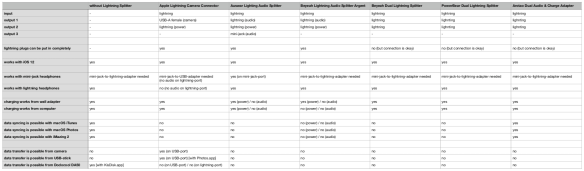
Yes, if you only want to use a pair of wired headphones and chargeΒ your iPhone at the same time, all lightning-splitters I’ve tested are up to the job. And if you have a USB-headphone (or a mini-jack-to-USB-adapter) you couldΒ even use theΒ Apple Lightning Camera Connector.

But if you want to connect anything else, the lightning-splitters that I’ve found won’t do the job… even the ones that claim to support data syncing didn’t support in iOS 12 in my testing…

So, for now it’s only power&audio-splitters…

Here‘s an in-depth comparison [open attached file] of the lightning-splitters I’ve tested :

Apple Lightning Camera Connector

Auswar Lightning Audio Splitter

BeyeahΒ Lightning Audio Splitter Argent

BeyeahΒ Dual Lightning Splitter

PowerBear Dual Lightning Splitter

Arotao Dual Audio & Charge Adapter


My recommendationsΒ would be :

  • if you want aΒ mini-jack-adapterΒ for your headphone : get theΒ AuswarΒ Lightning Audio Splitter
  • if you want data-transfer : get theΒ Apple Lightning Camera Connector