tip : surfing the internet while in Rescue Mode

Question : My Mac’s network connection is messed up, and I need to download software to update of fix this – what can I do ?

Answer : Since OSX 10.7 Lion, there is an easy way to do this if your networking-problem is software-related, not broken hardware.*

1- restart with the ‘CMD’ + ‘R’ keys pressed (‘Rescue Mode’)

2- then use Safari (listed as ‘online help’) to go online

3- go into Safari’s preferences and change the download folder to a USB-stick or external hard drive (just make sure it has enough space to hold the file you’re going to download)

4- go to the site you need to get the download from, and download

5- restart your Mac normally and install the download from within OSX

* = in Rescue Mode you will be able to connect to the network (and the internet) both though a UTP/Ethernet-cable or WiFi/AirPort-wireless, so only if BOTH your Ethernet-hardware card AND your AirPort-hardware card are broken, this will not work…

BEWARE ! : FBI warns not to upgrade software through free-WiFi !

The FBI has reported that users of ‘out-of-home-WiFi’ (free-WiFi hotspots, hotel WiFi, etc.) have become infected with malware, while upgrading ‘a widely used software product’.

http://www.fbi.gov/scams-safety/e-scams

The original report states :

“Recently, there have been instances of travelers’ laptops being infected with malicious software while using hotel Internet connections. In these instances, the traveler was attempting to set up the hotel room Internet connection and was presented with a pop-up window notifying the user to update a widely used software product. If the user clicked to accept and install the update, malicious software was installed on the laptop. The pop-up window appeared to be offering a routine update to a legitimate software product for which updates are frequently available.”

Even though the software product is not mentioned by name, it is good to inform you that one of the most common software products using this type of upgrades is Adobe Flash… so watch out when upgrading Adobe Flash (and any other software upgrade that is offered) when you are not on your own private WiFi-network.

So… here are some useful guidelines regarding software updates while traveling :

1- if you can do without upgrading, don’t upgrade while traveling ; wait until you’re back home on your own trusted WiFi-network

2- if you really need to upgrade, take these precautions : when you are prompted to upgrade any software while on an ‘out-of-home-WiFi’-network, click to close the pop-up window that is urging you to upgrade. Then either use OSX’s built-in “Software Update…” feature, or open the (Mac) App Store to download your updates from there, or manually type the URL of the known software-maker and download the software update directly form their site (after having double checked that your installed version is not the latest one).

Note : in the case of of the Adobe Flash browser plugin, the software-maker’s website is Adobe.com

fixed : 10.7.4 refusing to see the Atheros AR9280 (same error as in 10.7.3)

Question :

After the update to OSX 10.7.4 the “WiFi : no hardware installed” error is back on my Mac that has an Atheros AR9280 AirPort card, how can I fix this ?

Answer :

The solution is the same as in OSX 10.7.3 :

(Re)install the “Edited Atheros Kext for Lion*3″ you can download here :

https://macmanus.nl/wp-content/uploads/2012/02/edited-atheros-kext-for-lion3-zip.doc

Note : after downloading the file “edited-atheros-kext-for-lion3-zip.doc” you need to rename the file to “edited-atheros-kext-for-lion3.zip” and double-click it to unzip. To install follow the instructions as lined out in the “CAUTION ! (Read Me).txt”-file

The latest version of the .kext-installer that’s needed can be downloaded here :

http://cvad-mac.narod2.ru/Kext_Utility

or here :

KextUtility for OSX 10.8

TIP : your Atheros AR9280 AirPort card and AirPort network are automatically detected when you restart in Rescue Mode… so restart with the ‘CMD’ + ‘R’ keys pressed (‘Rescue Mode’), then use Safari (listed as ‘online help’) to go online and download both files from the links above. If you get a warning that there’s no space in your download folder (because you’re in Rescue Mode), just go into Safari’s preferences and change the download folder to a USB-stick or external hard drive. Now do a normal restart and install the old .kext file and restart afterwards. Done.

Donate Button (all)

————————–

Some background info for those interested :

What is installed by the 10.7.4 installer :

IO80211Family.kext (v4.1.2)
– including these Plugins :
AirPortAtheros21.kext (v4.3.1)
AirPortAtheros40.kext (v5.0.4)
AirPortBrcm4331.kext (v5.3)
AppleAirPortBrcm43224.kext (v5.0.1)
IO80211NetBooter.kext (v4.2)

…which gives the “no hardware installed” error yet again on systems with the Atheros AR9280 AirPort-card…

What I’ve tried and didn’t work :

1- normal restart with ‘reopen windows when logging back in’ unchecked ; still the same ‘no hardware installed’ error

2- repair disk permissions, followed by a full shut down with ‘reopen windows when logging back in’ unchecked, followed by a normal startup ; still the same ‘no hardware installed’ error

3- installing the OSX 10.7.4 Client Combo Update (from Apple.com) ; still the same ‘no hardware installed’ error

tip : play some Angry Birds on your Mac for free [1]

Question :

On my iPhone and iPad I can play some Angry Birds games for free by using the “Lite” (demo) version from the iTunes App Store instead of the full (paid) version… but on my Mac I can only get Angry Birds in the full (paid) version and only through the Mac App Store… why isn’t there a free (demo) version for my Mac ?

Answer :

You can play Angry Birds for free on your Mac (some levels), not only on OSX 10.6+ Intel Macs…

…even G4 & G5 PPC Macs running OSX 10.5 Leopard are eligible…

just use your web browser, and play online from Rovio’s official Angry Birds website :

Angry Birds Chrome beta (using Safari 5 you can play online, Google Chrome will give the option to play offline) :

http://chrome.angrybirds.com/

Angry Birds FuijTV (Japanese costumes version) :

http://fujitv.angrybirds.com/

Angry Brids Wonderful Pistachios (“The Hunt For The Golden Pistachio” version)

http://getcrackin.angrybirds.com/

Angry Birds Volcano (“Tyrkisk Peber” version)

http://fazer.angrybirds.com/Index.jsp

Enjoy ! 😉

—— [ UPDATE ] ——————————————————————–

I found some other ones, but they’re not on Rovio’s official webpage (so please be aware of any potentially harmful links these may present to you ; even though we don’t expect any) :

Angry Birds Rio (asian online demo version)

http://www.angrybirdsriogame.com/wp-content/uploads/2011/08/angrybirdsrio.swf

Angry Birds (asian online demo version)

http://www.mijngame.nl/files/angry-birds-flash-game.swf

—— [ UPDATE #2 ] ——————————————————————–

There is a new Angry Birds promotional version on Rovio’s official webpage :

Angry Birds Coca-Cola (asian language version)

http://coca-cola.angrybirds.com/

(you need to register and be of legal age, but as it’s in some asian language that I don’t understand, I can’t help you on this one ; please report back is you’ve figured it out…)

—— [ UPDATE #3 ] ——————————————————————–

Yet another new Angry Birds promotional version on Rovio’s official webpage :

Angry Birds Heikki (‘Finnish unite’ team-up of F1 racer Heikki Kovalainen and Angry Birds)

http://heikki.angrybirds.com/

(registration required)

new levels will be added as the F1 season unrolls :

Upcoming levels:
Hockenheim — 11.7.2012
Budapest — 25.7.2012
Spa — 22.8.2012
Monza — 5.9.2012
Singapore — 12.9.2012
Suzuka — 26.9.2012
Yeongam — 3.10.2012
New Delhi — 17.10.2012
Yas Marina — 31.10.2012
Austin — 7.11.2012
Sao Paolo — 21.11.2012

—— [ UPDATE #4 ] ——————————————————————–

Some new links to official demos of Angry Birds Rio and Angry Birds Star Wars are in my follow-up post :

https://macmanus.nl/2013/03/23/tip-play-some-angry-birds-on-your-mac-for-free-2/

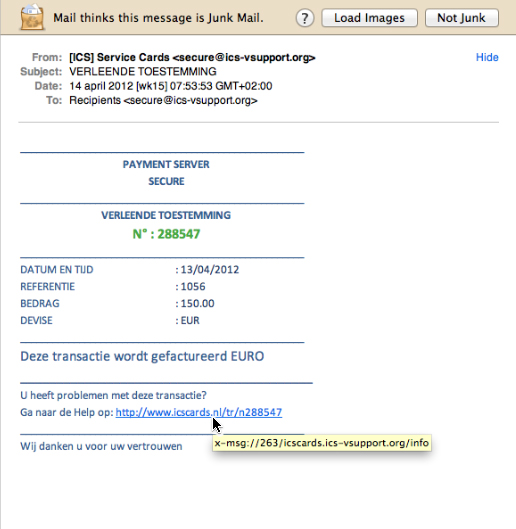
tip : 6 obvious ways to spot a phishing eMail

Not all phishing* attempts are easy to spot, but today I came across one that has some very obvious examples of what to beware of :

* FYI : phishing = an attempt to lure you into giving some unreliable source your private info of your credit card and/or bank account (internet criminals are ‘fishing’ for your secure info this way…)

1- OSX Mail.app has indicated it thinks this is “Junk Mail”

(though Mail.app isn’t 100% reliable on its suggestions of Junk Mail, it’s a good indication you should have a thorough second look)

2- the sender of the eMail is not sending from a reliable and/or known eMail address

a “.ORG”-eMail address will 100% not be something used by a bank

3- you are not the sole recipient of this eMail and/or your personal eMail address is not listed

if this were such strictly confidential info as is claimed, why would any bank send it to anyone else but you personally ? (furthermore : banks do not contact you on things like this though eMail, because of security reasons…)

4- you are not personally addressed in the text of the eMail, and neither is it indicated what the payment was for and to whom it would have been made

if this where an eMail form your bank or payment service to inform you on anything personal, why wouldn’t they inform you what it’s about straight away ?

5- the weblink-URL that’s included does not link to the website that is listed in its name, but to some completely different website

if you do a mouse-over on the URL in the eMail, a completely different URL is appears in a yellow highlighted line – now that’s about the best indication you could get that you’re being mislead !

6- if you lookup the actual domain that this eMail was sent from and is (re)directing to in WhoIs?, it gives registrant info that does not seem like any bank of payment service you know (especially the fact that it was created just a few days ago makes this extremely suspicious)

you can find info on the registrant of any website on WhoIs? :

http://www.whois.com/whois/

try that with the domain used in this example and you’ll see info that is really suspicious :

A- a registrant eMail address that is on Hotmail…

B- a registrant street address that can not be found in Google Maps…

C- a registration creation date that is just a few days ago…

tip : TimeMachine will also backup attached USB-sticks that are Mac-formatted

Question :

My old G4 iBook running MacOSX 10.5.8 Leopard has a hard drive of just 40GB inside ; upgrading that will cost far more than plugging in a 32GB (nano) USB-stick, but…

If I do so… will TimeMachine also backup the files from my 32GB USB-stick ?

Answer :

Yes !

TimeMachine will backup the data from any USB-stick without have to make any adjustments to TimeMachine, but you need to make sure that :

1- the USB-stick is properly plugged into your Mac (seems only too obvious, but since it is so easy to detach it without thinking about it… just double check !)

2- the USB-stick is formatted as a genuine Mac-drive, so in HFS+ format (PC/FAT-formatted USB-sticks need to be re-formatted to HFS+, else TimeMachine will not recognize them… but beware : reformatting a USB-stick will erase all it’s content… so start out by moving all data to your hard drive, then reformat the USB-stick and only after that, put the data back onto the USB-stick)

Flashback trojan finally detected by built-in OSX malware detection

Apple introduced built-in Malware Detection in OSX 10.6 Snow Leopard (and OSX 10.7 Lion also of course). This works very good and updates automatically whenever your connected to the internet and Apple releases new malware definitions…

…this week (online) news sources were warning Mac-users that Apple still hasn’t updated for the latest expoit of Java by the Flashback trojan horse malware…

Today however the Java update was released by Apple :

http://support.apple.com/kb/HT5228

As always : to install this update, just use OSX’s built-in Software update feature (find it under the Apple-icon menu in the left top corner of your screen).