tip : which Apple devices will support …OS 26 ?

Question :
At the 2025 WWDC Apple introduced beta versions of the Apple OSes that will be released this fall as …OS 26.

Which devices will support these new versions of Apple OSes ?

Answer :
The latest info of the system requirements of the …OS 26 is as follows :

macOS 26 Tahoe

  • MacBook Pro with Apple silicon (2020) M1 and newer
  • MacBook Pro 16″ (2019)
  • MacBook Pro 13″ (2020, Four Thunderbolt 3 ports)
  • MacBook Air with Apple silicon (2020) M1 and newer
  • iMac (2021) M1 and newer
  • iMac 27″ (2020)
  • Mac mini (2020) M1 and newer
  • Mac Studio (2022) M1 and newer
  • Mac Pro (2019) and newer

iOS 26

  • iPhone 11 (2019) and newer : including all Pro/mini/Max/Plus-versions and iPhone 16e
  • iPhone SE 2nd gen (2020) and newer

iPadOS 26

  • iPad Pro 13″ with Apple silicon (2024) M4
  • iPad Pro 12.9″ 3rd gen (2018) and newer
  • iPad Pro 11″ 1st gen (2019) and newer
  • iPad Air with Apple silicon (2022) M1 and newer
  • iPad Air 3rd gen (2019) and newer
  • iPad 8th gen (2020) and newer
  • iPad mini 5th gen (2019) and newer

watchOS 26

  • AppleWatch Series 6 (2020) and newer
  • AppleWatch SE 2nd gen (2022)
  • AppleWatch Ultra (2022) and newer

tvOS 26

  • without Liquid Glass interface support : AppleTV HD (2015)
  • without Liquid Glass interface support : AppleTV 4K 1st gen (2017)
  • including Liquid Glass : AppleTV 4K 2nd gen (2021) and newer

not upgradeable to Apple …OS 26 :

  • MacBooks stuck at macOS 15 Sequoia : MacBook Air 13″ (2020 with Intel Core), MacBook Pro 13″ (2019 with Two Thunderbolt 3 ports & any 2018), MacBook Pro 15″ (2019 & 2018)
  • Macs stuck at macOS 15 Sequoia : Mac mini (2018), iMac Pro (2017) & iMac (2019)
  • iPhones stuck at iOS 18 : iPhone XR (2018) & XS / XS Max (2018)
  • iPads stuck at iPadOS 18 : iPad 7th gen (2019)
  • AppleWatches stuck at watchOS 12 : AppleWatch SE 1st gen (2020)
  • AppleWatches stuck at watchOS 10 : AppleWatch Series 4 (2018) & Series 5 (2019)

fixed : which Macs, iPads and iPhones can Apple Intelligence run on ?

Question :
As Apple is starting to roll out it’s own version of AI, entitled Apple Intelligence, the most important question seems to be :

Is my current Mac, iPad or iPhone able to run Apple Intelligence ?


Answer :
Apple has published the specs needed for Apple Intelligence :
– OS specs : iOS 18.4, iPadOS 18.4 or macOS 15.3 Sequoia or newer
– software specs : Siri needs to be turned ON
– CPU specs : A17 Pro, A18 or M1 or newer

translating the CPU specs into device specs :

iPhone : iPhone 16 / 16 Plus (2024) and newer
iPhone Pro : iPhone 15 Pro / 15 Pro Max (2023) and newer
iPhone SE : iPhone 16e (2025) and newer
iPad : -none- !! not even the iPad 11 (2025) !!
iPad mini : iPad mini 7th gen. (2024) and newer
iPad Air : iPad Air 5th gen. (2022) and newer
iPad Pro : iPad Pro 3rd gen. [11″] & 5th gen. [12.9″] (2021) and newer
MacBook : -none- !! the latest MacBooks from 2017 were Intel-based !!
MacBook Air : MacBook Air M1 (2020) and newer
MacBook Pro : MacBook Pro M1 (Late 2020) and newer
iMac : iMac M1 (2021) and newer
Mac mini : Mac mini M1 (2020) and newer
Mac Studio : Mac Studio M1 (2022) and newer
Mac Pro : Mac Pro M2 (2023) and newer

At the time of writing (March 2025) Apple Intelligence does come with the current OS versions in beta only… the general release date planned for April 2025 seems to be postponed.
If the official general release has only been postponed for certain regions (e.g. the EU) is not clear. According to Apple, the initial release will only include English, Chinese, Spanish, German, French, Portuguese, Italian, Japanese and Korean. Other languages will follow later on, but Dutch will probably not be one of the first to join.


fixed : iCloud syc error – Desktop files on Mac have ‘cloud exclamation mark’-icon

Question :
I was trying to access some files I have created on my Mac from my iPad, but the files that are in folder XYZ on my Mac’s Desktop are different from the ones that I can see in that same Folder XYZ when I access it from the Files.app on my iPad. Some files in Folder XYZ are the same and some are not… closing/quitting the Files.app on my iPad and reopening it doesn’t help… And when I look on my Mac, the files that are invisible on my iPad turn out to have a ‘cloud with an exclamationmark’-icon next to them on my Mac… I’ve also checked on my iPhone, and there I get to see the exact same content of Folder XYZ as on my iPad, but not the ones that are on my Mac…

This appears to be an ICloud syncing problem, but how do I fix it ?

Answer :
Yes, this is a syncing problem that iCloud sometimes runs into…
since there is no forced sync or manual sync option, this is how to fix it :
1- make sure that your Mac, your iPad and your iPhone all run the newest version of their OS (macOS, iPadOS, iOS)
2- make sure that your Mac, your iPad and your iPhone are all connected to a stable internet connection (either over Wifi or Ethernet)
3- make sure that you are logged in on iCloud with exactly the same account on all devices (Mac, iPad, iPhone)
4- if all the above is in place, restart your Mac without remembering open windows (to increase you chances on fixing this iCloud syncing problem, restart your iPad and iPhone as well)
5- wait for your Mac to restart/reboot entirely before doing anything else on it
6- wait for iCloud to sync back and forth amoung your Mac, iPad and iPhone (depending on the amount of files you have in your iCloud folders and your internet speed this may take up to 10 minutes or even longer)

That’s it !
…in 99% of the cases, this simple solution will fix your iCloud syncing problem
enjoy 😉

fixed : AppleID password not accepted on Apple website

Question :

I am trying to make a reservation for a repair of my iPhone through the Apple website, and I can go through all the steps until I need to give my password to login with my Apple ID… it just won’t accept the correct password !

What is going on ? And How can I fix this ?

Answer :

Yes, it’s bizar that Apple isn’t clear why this doesn’t work the way you would expect it to…
But the solution is simple :

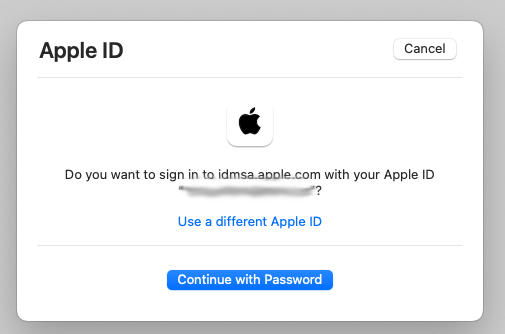
  • when you get the “Do you want to sign in to dims.apple.com with your AppleID?” window, click the blue “Continue with Password” button
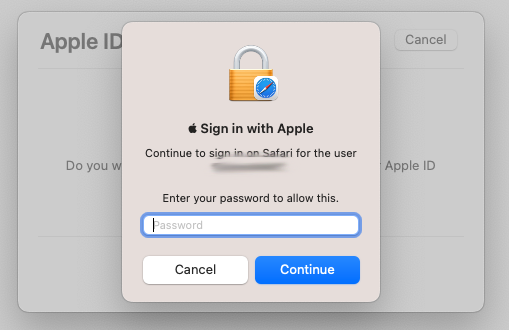
  • then you will get the “Sign in with Apple” window… and then, DO NOT enter your AppleID password !! ; you need to enter the password you use to unlock your Mac !!

…there is some (weird Apple) logic behind this, but it is completely unclear why Apple made this so confusing… [ Apple is asking for your password to unlock your passwords keychain in Safari ; but you will only get that from the text “Continue to login on Safari for the user” AFTER you have figured out some other way what the solution is… ]

On the other hand… that’s it !

enjoy 😉

fixed : which version of Java do I have ?

Question :

I would like to know which version of Java I have installed on my Mac, since the software I want to use will only run on Java 7 or higher.

How can I check (and update) ?


Answer :

Java is a free software platform which is operation system independent (so Mac & PC) created and maintained by Oracle. Despite it always having been a very reliable way of making cross platform games & applications, Apple has restricted the use of Java to ‘only when needed’ by default in the latest versions of OSX and macOS, because of the security risks involved in using Java and similar software that can run autonomously on your Mac next to macOS.

To find out which version of Java you have installed, do the online check that’s on this official website :

https://java.com/en/download/installed.jsp

Just follow the instructions given and the result of the check will be shown : you will either have the latest version installed, or you won’t… in that case update instructions will guide you to getting the latest version available for your Mac.

enjoy 😉

fixed : install OSX 10.11 El_Capitan on unsupported Macs

Question :

I read somewhere that it is possible to install the latest version of OSX 10.10 Yosemite on my Mac, even though the official installer refuses to install.

Can you give me any directions ?


Answer :

Installing newer versions of OSX on slightly older Macs that do not meet the official system requirements can be done using MacPostFactor (MCPF).

MacPostFactor also supports installing OSX versions up to OSX 10.10 Yosemite on older Macs. And a new version that supports installing OSX 10.11 El_Capitan is in the works.

For more info (and downloads), go to the info page on MacRumors.com :

http://forums.macrumors.com/threads/os-x-yosemite-on-unsupported-macs-guide.1761432/

or see the (less readable) official page of the MacPostFactor team :

http://osxhackers.net/MCPF/

…in short :

!!! THIS IS FOR (RATHER) EXPERIENCED MAC-USERS ONLY, AND SHOULD NOT BE DONE ON YOUR ‘ONE AND ONLY’ MAC !!!

!! REMEMBER : DO FOLLOW THE COMPLETE INSTRUCTIONS THAT CAN BE FOUND HERE : MacPost Factor info page on MacRumors.com

…that should be it !

enjoy !

😉

Donate Button (MacManusNL)

fixed : install OSX 10.10 Yosemite on unsupported Macs

Question :

I read somewhere that it is possible to install the latest version of OSX 10.10 Yosemite on my Mac, even though the official installer refuses to install.

Can you give me any directions ?


Answer :

Installing newer versions of OSX on slightly older Macs that do not meet the official system requirements can be done using MacPostFactor (MCPF).

MacPostFactor (MCPF) also supports installing OSX versions up to OSX 10.10 Yosemite on older Macs. And a new version that supports installing OSX 10.11 El_Capitan is in the works.

For more info (and downloads), go to the info page on MacRumors.com :

http://forums.macrumors.com/threads/os-x-yosemite-on-unsupported-macs-guide.1761432/

or see the (less readable) official page of the MacPostFactor team :

http://osxhackers.net/MCPF/

…in short :

!!! THIS IS FOR (RATHER) EXPERIENCED MAC-USERS ONLY, AND SHOULD NOT BE DONE ON YOUR ‘ONE AND ONLY’ MAC !!!

!! REMEMBER : DO FOLLOW THE COMPLETE INSTRUCTIONS THAT CAN BE FOUND HERE : MacPost Factor info page on MacRumors.com

…that should be it !

enjoy !

😉

Donate Button (MacManusNL)