tip : which Apple devices will support …OS 26 ?

Question :
At the 2025 WWDC Apple introduced beta versions of the Apple OSes that will be released this fall as …OS 26.

Which devices will support these new versions of Apple OSes ?

Answer :
The latest info of the system requirements of the …OS 26 is as follows :

macOS 26 Tahoe

  • MacBook Pro with Apple silicon (2020) M1 and newer
  • MacBook Pro 16″ (2019)
  • MacBook Pro 13″ (2020, Four Thunderbolt 3 ports)
  • MacBook Air with Apple silicon (2020) M1 and newer
  • iMac (2021) M1 and newer
  • iMac 27″ (2020)
  • Mac mini (2020) M1 and newer
  • Mac Studio (2022) M1 and newer
  • Mac Pro (2019) and newer

iOS 26

  • iPhone 11 (2019) and newer : including all Pro/mini/Max/Plus-versions and iPhone 16e
  • iPhone SE 2nd gen (2020) and newer

iPadOS 26

  • iPad Pro 13″ with Apple silicon (2024) M4
  • iPad Pro 12.9″ 3rd gen (2018) and newer
  • iPad Pro 11″ 1st gen (2019) and newer
  • iPad Air with Apple silicon (2022) M1 and newer
  • iPad Air 3rd gen (2019) and newer
  • iPad 8th gen (2020) and newer
  • iPad mini 5th gen (2019) and newer

watchOS 26

  • AppleWatch Series 6 (2020) and newer
  • AppleWatch SE 2nd gen (2022)
  • AppleWatch Ultra (2022) and newer

tvOS 26

  • without Liquid Glass interface support : AppleTV HD (2015)
  • without Liquid Glass interface support : AppleTV 4K 1st gen (2017)
  • including Liquid Glass : AppleTV 4K 2nd gen (2021) and newer

not upgradeable to Apple …OS 26 :

  • MacBooks stuck at macOS 15 Sequoia : MacBook Air 13″ (2020 with Intel Core), MacBook Pro 13″ (2019 with Two Thunderbolt 3 ports & any 2018), MacBook Pro 15″ (2019 & 2018)
  • Macs stuck at macOS 15 Sequoia : Mac mini (2018), iMac Pro (2017) & iMac (2019)
  • iPhones stuck at iOS 18 : iPhone XR (2018) & XS / XS Max (2018)
  • iPads stuck at iPadOS 18 : iPad 7th gen (2019)
  • AppleWatches stuck at watchOS 12 : AppleWatch SE 1st gen (2020)
  • AppleWatches stuck at watchOS 10 : AppleWatch Series 4 (2018) & Series 5 (2019)

fixed : AppleID password not accepted on Apple website

Question :

I am trying to make a reservation for a repair of my iPhone through the Apple website, and I can go through all the steps until I need to give my password to login with my Apple ID… it just won’t accept the correct password !

What is going on ? And How can I fix this ?

Answer :

Yes, it’s bizar that Apple isn’t clear why this doesn’t work the way you would expect it to…
But the solution is simple :

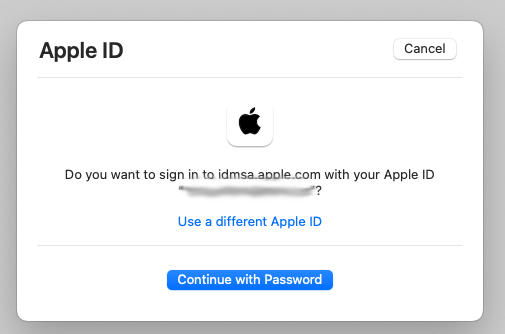
  • when you get the “Do you want to sign in to dims.apple.com with your AppleID?” window, click the blue “Continue with Password” button
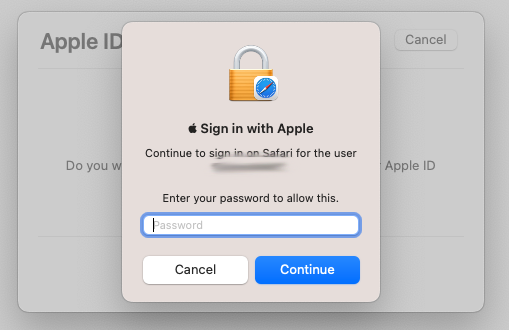
  • then you will get the “Sign in with Apple” window… and then, DO NOT enter your AppleID password !! ; you need to enter the password you use to unlock your Mac !!

…there is some (weird Apple) logic behind this, but it is completely unclear why Apple made this so confusing… [ Apple is asking for your password to unlock your passwords keychain in Safari ; but you will only get that from the text “Continue to login on Safari for the user” AFTER you have figured out some other way what the solution is… ]

On the other hand… that’s it !

enjoy 😉

tested : does the Satechi USB-C hub for Mac mini also work with the iPad Pro ?

Question :

I am looking for a USB-C hub to extend the ports on my iPad Pro. I found this Satechi USB-C hub that is designed for the 2018 Mac mini that looks like an interesting option.

Does the iPad Pro work with this Satechi USB-C hub ?


Answer :

Simply put : Yes, the Satechi USB-C hub for Mac mini works with iPad Pro, but…

What does work :

  • the iPad Pro will recognize the following devices when plugged into the Satechi hub :
    • a mini-jack headphone
    • a USB-keyboard
    • a wireless RF-keyboard (connected through a USB-dongle)
    • a micoSD memory card

What doesn’t work :

  • the Satechi hub’s USB-C port can not be used to charge the iPad Pro
  • the Satechi hub’s USB-C connection cable is too short (when the iPad Pro is in the official Bluetooth keyboard-stand the Satechi hub will not be able to stand on it’s four feet, it will hang from the connection cable)
  • the Satechi hub’s size is large, mainly to fit under a Mac mini and to house a cooling fan, both are completely useless for an iPad Pro… is just too bulky

Final advise : even though it works okay, do not buy this Satechi USB-C hub if you want to use it with an iPad Pro primarily.

That’s it. Sorry. 😉

NOTE : the Satechi USB-C hub works great with the space grey Mac mini (2018 and newer).


fixed : charge and use headphones at the same time on USB-C iPad Pro

Question :

My 2018 iPad Pro is great. I can use it for most of the office work I previously did on my MacBook. I have also started to use my iPad Pro for conference calls. For that I would like to wear my favorite over-ear headphones, which have a 3.5mm mini-jack and noise canceling. I got an official Apple USB-C-to-minijack adapter for that, but then I run into the problem that I cannot charge my iPad Pro at the same time. I have seen that there are various docking stations and port-multipliers that work with the USB-C iPad Pro, but those are very expensive…

Isn’t there a simpler solution ?


Answer :

Yes there is, but your choices are very limited : there are various splitters available that split the USB-C port into a USB-port and an audio-port… but : BEWARE ! nearly every single one of them does NOT work with the iPad Pro !!! (most of them only work on Android devices)

There is only one of the simple (and very affordable) splitters that is tested to work with the 2018 iPad Pro :

ESR 2-in-1 USB-C PD Headphone Jack Adapter ( buy it on Amazon UK / Amazon DE )

Note 1 : this splitter’s USB-C port is only capable of charging, not for a USB-(data)stick or a USB-keyboard or anything other than a USB-C charger

Note 2 : this splitter’s audio mini-jack does support both audio-out and audio-in, so when using headphones with a microphone (like gaming headsets) that microphone is used, but when using a regular headphone, the iPad Pro’s built-in microphone will be used

That’s it !

enjoy 😉

fixed : how to fully close apps on an iPhone X / XS / XR ?

Question :

I just got a new iPhone X without a Home button. On my previous iPhone I always used to shut down apps that were needlessly running in the background by double clicking on the Home button which brought up the underwater-screen where I could go through all apps that were open in the background and just pick the app and swipe up to close it…

But now, without a Home button, how do I do that ?


Answer :

as you would expect, it’s simple…

but as you have already experienced, it’s not intuitive for anyone who has grown familiar with using the Home button… since the release of iOS 12, it basically comes down to :

“swipe-up & hold”

to be more precise :

  • make sure the iPhone is unlocked (using FaceID or maybe even your unlock code)
  • then swipe upward from the bottom of the screen and keep your finger on the screen
  • now the underwater screen that you were searching for will appear and you can browse through all open apps and swipe up to close the ones you aren’t using (it actually looks less and less like an underwater screen, it’s more like the Cover Flow feature in iTunes and Finder on macOS)

we used to do this on older iPhones to regain RAM space to keep your iPhone running smoothly… on new iPhones that’s possibly less relevant, but it still feels good to know you can do this when you need to 😉

enjoy !

fixed : feeling of writing on paper for iPad Pro

Question :

I recently overheard a designer talking enthusiastically about a screen protector or something he had on is iPad Pro, which gave him the feeling as if he was writing on traditional paper when he was actually using his Apple Pencil on his iPad Pro.

Can you tell me what he was talking about ?


Answer :

He was probably talking about one of these two :

Paper Feel (by Geevon) get it at Amazon.com

PaperLike (by Sapper) get it at Amazon.co.uk or Amazon.de

Paper-Like (by ClearView) get it at Amazon.com

…and don’t forget to select the right size for your iPad Pro ; they’re available in 9.7″, 10.5″ and 12.9″

Enjoy 😉